
What Is a Smart Home? A Beginner’s Guide for Saudi Homes
Imagine leaving your home and suddenly wondering whether you switched off the lights, heater, air conditioner, or another appliance. In a traditional home, you may need to return and check. In a smart home, you can open an application on your phone, check the device, and switch it off remotely.
This simple example explains why smart homes are becoming increasingly attractive to families, apartment residents, homeowners, and tenants across Saudi Arabia.
A smart home does not have to be a fully automated villa filled with expensive equipment. You can begin with one affordable device, such as a smart plug or smart light switch, and gradually add more devices according to your needs.
This beginner’s guide explains what a smart home is, how smart home technology works, which devices are useful for Saudi homes, and how you can begin your smart home journey.
What Is a Smart Home?
A smart home is a house or apartment containing connected devices that can be monitored, controlled, or automated through a mobile application, voice assistant, timer, or predefined schedule.
These connected products may include:
- Smart light switches
- Smart plugs
- Smart heater switches
- Smart air-conditioner controls
- Smart curtain switches
- Smart remote controls
- Smart security cameras
- Smart sensors
- Smart locks
Instead of controlling every device only through a traditional switch or remote control, smart home technology gives you additional ways to manage your home.
For example, you may be able to:
- Turn the lights on or off from your phone
- Switch off an appliance when you are outside
- Schedule the water heater to operate at selected times
- Control several devices using voice commands
- Share device control with family members
- Create routines for mornings, evenings, workdays, or travel
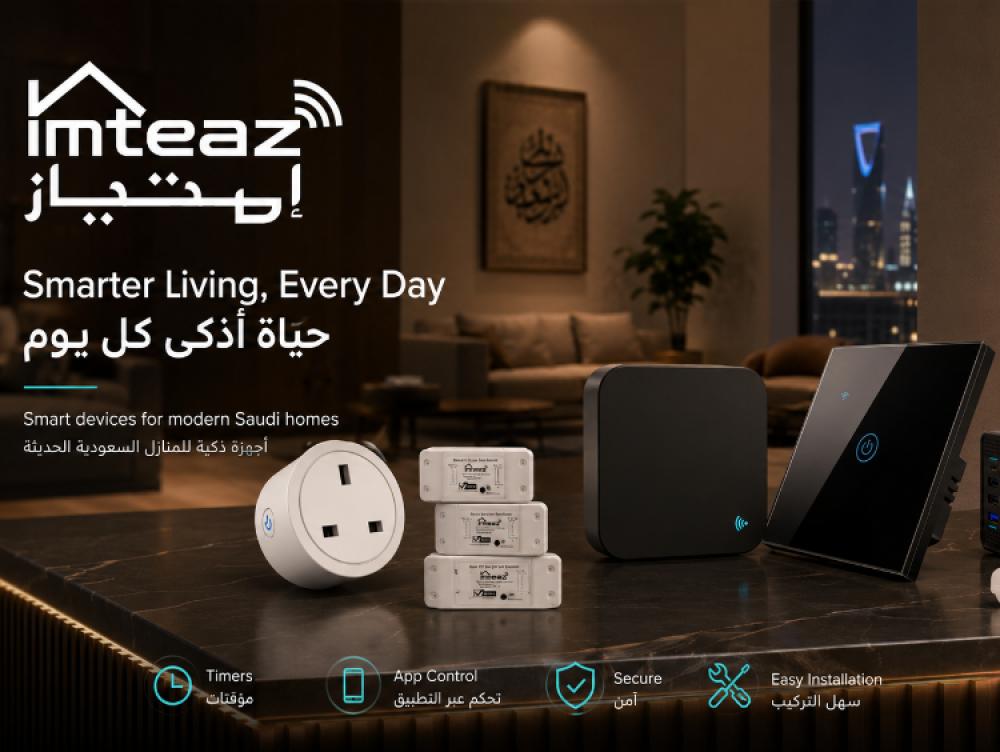
Imteaz offers WiFi smart plugs, light switches, heater and AC switches, relays, and infrared remote controls designed for mobile control. Its listed smart devices support Alexa and Google Home, work without a separate hub, and can be controlled remotely through an Arabic- and English-supported application.
How Does a Smart Home Work?
Most beginner-friendly smart home devices follow a simple process.
1. The device connects to your WiFi network
A compatible smart switch, plug, or controller connects to the internet through your home WiFi network.
2. You add the device to a mobile application
The application allows you to pair the product, give it a name, assign it to a room, and manage its settings.
You could name devices according to their location or purpose, such as:
- Living Room Light
- Bedroom Lamp
- Kitchen Appliance
- Water Heater
- Majlis Air Conditioner
Clear names make the devices easier to control, especially when using voice commands.
3. You control it through the application
Once connected, you can use the application to turn the device on or off, set a timer, create a schedule, or check its status.
Remote access can be especially useful when you are at work, travelling, visiting family, or simply relaxing in another room.
4. You create schedules or automations
A schedule tells a smart device to perform an action at a specific time.
For example:
- Turn the outdoor lights on at 6:30 p.m.
- Switch the water heater off after 30 minutes
- Turn selected lights off at bedtime
- Open motorised curtains in the morning
- Switch off a connected appliance during working hours
The available automation options depend on the device and application being used.
5. You may use voice control
Compatible devices can also work with platforms such as Amazon Alexa and Google Home. This allows you to use simple voice instructions instead of opening the application.
Examples include:
- “Turn off the living room light.”
- “Switch on the bedroom lamp.”
- “Turn off the heater.”
- “Open the curtains.”
Voice control is optional. You can continue using the wall switch, application, timer, or physical button when available.
Why Are Smart Homes Useful in Saudi Arabia?
Smart home technology can solve several practical problems in Saudi households.
Greater control over cooling and heating
Air conditioners, water heaters, fans, and other high-use devices are important parts of daily life in Saudi Arabia. Smart controls can make it easier to manage when selected devices operate.
For example, a suitable smart switch may allow you to turn off a heater remotely or create a timer so that it does not remain on longer than needed.
Always choose a product rated for the electrical load of the appliance. High-load equipment should only be connected to a compatible device and installed by a qualified electrician.
Convenience for busy households
Many families manage work, school, shopping, appointments, and travel throughout the week. Smart schedules reduce the need to remember every small action manually.
A programmed routine can turn selected lights off at bedtime or switch an appliance off automatically after a chosen period.
Remote control while travelling
Whether you are travelling between Riyadh, Jeddah, Dammam, another Saudi city, or outside the Kingdom, remote control can provide additional convenience.
You may be able to check whether a connected device is on, switch it off, or adjust its schedule without being physically present.
Easier control for the whole family
Many smart home applications allow device access to be shared with more than one authorised user. This means parents or other household members can control selected devices from their own phones.
Access should only be shared with trusted people.
Better use of electricity
Smart products do not automatically guarantee lower electricity bills. However, schedules, timers, and remote controls can help reduce unnecessary operating time.
The greatest benefit comes from using the features consistently—for example, switching off unused lights and preventing selected appliances from remaining on accidentally.
Best Smart Home Devices for Beginners
You do not need to automate your entire home immediately. Begin with a device that solves a clear, everyday problem.
1. Smart WiFi Plug
A smart plug is one of the easiest ways to begin.
It connects to a regular electrical socket and allows a suitable appliance to be controlled through an application. Depending on the product specifications, it may be useful for lamps, coffee machines, chargers, televisions, and other compatible appliances.
A smart plug is a good starting option because it usually does not require modifications to the wall wiring. Imteaz’s smart plug guidance states that installation is not required: the plug is inserted into the socket and connected to WiFi.
Before connecting any appliance, check the smart plug’s voltage, current, wattage, and supported load.
2. Smart Light Switch
A smart light switch replaces or upgrades a traditional wall switch.
It can provide several control options:
- Manual touch or button control
- Mobile application control
- Timers and schedules
- Voice control
- Remote access
This is useful for bedrooms, living rooms, corridors, kitchens, majlis areas, and outdoor lighting.
Some smart switches require a neutral wire, while other models are designed to work without one. Check the wiring requirements before purchasing and use a qualified electrician for installation.
3. Smart Heater or AC Switch
A compatible high-load smart switch can be used for certain heaters, air conditioners, or motors, depending on the device rating and appliance requirements.
This type of product can be useful when you regularly wonder whether the heater or another fixed appliance was left on.
Imteaz lists 40A smart switches designed for compatible heater, AC, or motor applications, with mobile, timing, touch or button, and voice-control features.
Electrical load compatibility is essential. Never connect a high-power appliance to an ordinary smart plug or low-rated switch.
4. Smart Curtain Switch
A smart curtain switch can control compatible motorised curtains.
Depending on the setup, you may be able to:
- Open the curtains
- Close the curtains
- Stop them at a selected position
- Schedule opening and closing times
- Control them by application or voice
This can be convenient for bedrooms, living rooms, offices, and large windows exposed to strong sunlight.
5. WiFi Infrared Remote Control
Many homes use separate remote controls for air conditioners, televisions, and other infrared appliances.
A compatible WiFi infrared controller may allow several supported devices to be managed through one mobile application. Compatibility must be checked before purchase because not every infrared appliance uses the same codes or commands.
Do You Need a Smart Home Hub?
A hub is a central device that connects and coordinates certain smart home products.
Some systems using Zigbee, Z-Wave, Thread, or proprietary technologies may require a hub. Many WiFi smart devices, however, connect directly to the home router and do not require an additional hub.
Imteaz states that its listed smart devices work directly through WiFi without a separate hub.
For a beginner, hub-free WiFi products can make the setup simpler. The correct choice still depends on the size of the home, number of devices, preferred ecosystem, and long-term automation plans.
Is a Smart Home Expensive?
A smart home can be created gradually.
You do not have to replace every switch or appliance at once. A practical starting plan could be:
- Add one smart plug to a frequently used lamp or compatible appliance.
- Upgrade the light switch in one important room.
- Add a compatible smart heater or AC switch.
- Create basic timers and schedules.
- Expand to other rooms only after becoming comfortable with the system.
Starting small allows you to test the application, WiFi coverage, installation requirements, and daily usefulness before buying more devices.
Is Smart Home Technology Difficult to Install?
The difficulty depends on the product.
A plug-in smart device may only require pairing through an application. A wall switch, relay, curtain controller, or high-load switch may require electrical wiring.
For wired installations:
- Turn off electricity at the distribution board
- Confirm the product’s wiring requirements
- Check whether a neutral wire is needed
- Confirm the electrical load
- Use a qualified electrician
- Test manual and application control after installation
Never perform electrical work without the required knowledge and safety precautions.
How to Keep Your Smart Home Secure
Smart devices are connected products, so digital security should be part of the setup.
Follow these basic steps:
- Use a strong and unique WiFi password
- Use a strong password for the smart home application
- Enable two-factor authentication when available
- Keep the application and device firmware updated
- Share access only with trusted household members
- Remove access for old users or unused phones
- Buy devices from a reliable seller
- Avoid using the same password across multiple services
- Secure your home router and change its default administrator password
You should also review the permissions requested by each application and avoid sharing account credentials unnecessarily.
How to Start Building a Smart Home
Use this simple beginner plan.
Step 1: Identify one everyday problem
Examples:
- Lights are frequently left on
- You forget to switch off the heater
- You want to control a lamp from bed
- Family members need shared control
- You want an appliance to operate on a timer
Step 2: Choose the correct smart product
Select the device according to the appliance, electrical load, wiring, and required features.
Step 3: Check compatibility
Confirm:
- Voltage and current rating
- Maximum supported load
- Neutral-wire requirement
- WiFi and application requirements
- Alexa or Google Home support
- Android or iOS compatibility
- Appliance type and installation method
Step 4: Install and connect the device safely
Use professional installation for wired products. Follow the product instructions when pairing it with the application.
Step 5: Create one simple schedule
Start with an automation that is easy to understand, such as switching off a light at bedtime.
Step 6: Expand gradually
Once the first device is working reliably, add another product that solves a different problem.
Frequently Asked Questions About Smart Homes
Can I turn off a smart device when I am outside my home?
Yes, many internet-connected smart devices support remote control through their mobile application, provided the device and home internet connection are online.
Can I use smart home devices in an apartment?
Yes. Renters can begin with non-permanent products such as smart plugs or compatible infrared remote controllers. Get the property owner’s approval before replacing wall switches or making electrical modifications.
Will a smart switch still work manually?
Many models continue to provide physical touch or button control. Check the individual product specifications before purchasing.
Do smart home devices work when the internet is disconnected?
Manual controls may continue to work on many products, but remote access, voice commands, and cloud-based automations may become unavailable until the internet connection returns.
Can several family members control the same device?
Many applications support family sharing or additional authorised users. Access should only be provided to trusted people.
Are Alexa and Google Home required?
No. Compatible voice assistants are optional. You can normally use the product’s mobile application and physical controls without owning a smart speaker.
What is the easiest smart device for a beginner?
A smart WiFi plug is generally one of the simplest starting options because it can be connected without replacing wall wiring. Always confirm that the appliance is compatible with the plug’s electrical rating.
Start Your Smart Home Journey with Imteaz
A smart home is not about filling your house with complicated technology. It is about making everyday activities easier, improving control, and automating repetitive tasks.
Start with one clear problem. Choose the correct device. Install it safely. Create a useful schedule. Then expand your system gradually.
Explore smart WiFi plugs, smart light switches, heater and AC switches, smart relays, and infrared remote controls from Imteaz to find a practical starting point for your home in Saudi Arabia.
Make your home smarter—one device at a time.